Microsoft Copilot Home vs Code vs Autopilot: What’s the Difference?
Microsoft Copilot Home vs Code vs Autopilot: What’s the Difference?
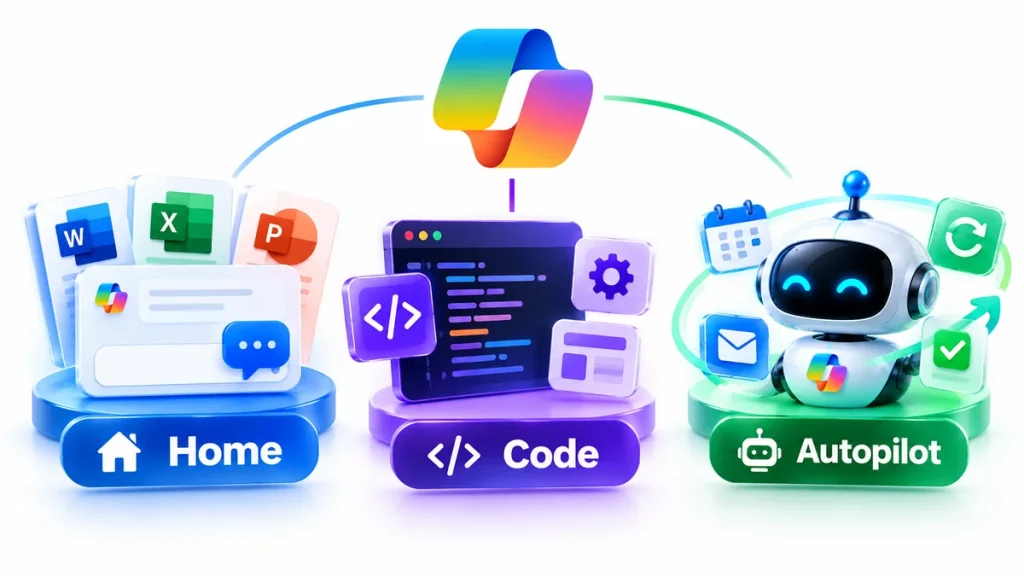
Microsoft has redesigned Copilot around three major experiences: Home, Code and Autopilot.
The new structure was announced on September 25, 2026, as Microsoft continues moving Copilot beyond a traditional AI chatbot and toward a broader platform for asking questions, delegating projects, building software and running autonomous workflows.
The three experiences serve very different purposes.
Copilot Home is designed to be the central place where users ask questions, work with Microsoft 365 files and delegate larger projects through Cowork.
Copilot Code lets users describe apps, dashboards, automations and workflows in natural language and have Copilot build them.
Copilot Autopilot is a persistent AI agent that can continue working on recurring responsibilities in the background without waiting for a new prompt every time.
A simple way to remember the difference is:
Home = Work
Code = Build
Autopilot = Automate
But the real differences become more important when you look at Microsoft 365 integration, pricing, availability and how much autonomy each experience receives.
This guide explains Microsoft Copilot Home vs Code vs Autopilot in detail and helps you understand which one is designed for which type of work.
Microsoft Copilot Home vs Code vs Autopilot at a Glance
| Feature | Copilot Home | Copilot Code | Copilot Autopilot |
|---|---|---|---|
| Main purpose | Ask, collaborate and create | Build apps and automations | Run persistent workflows |
| Chat | Yes | Not primary purpose | Agent interaction |
| Cowork | Integrated | Separate but connected | Different agent model |
| Word, Excel, PowerPoint | Integrated | Can build solutions around data/workflows | Can work across Microsoft 365 context |
| Natural-language app building | No | Yes | Not primary purpose |
| Persistent background work | Limited | Apps can persist | Yes |
| Recurring tasks | Through related workflows | Can build automations | Core feature |
| Own identity | No | No | Yes |
| Own memory | Standard Copilot context | Solution-specific | Yes |
| Own cloud computer | No | Runtime for built solutions | Yes |
| Teams integration | Yes | Through Microsoft environment | Yes |
| Outlook integration | Yes | Through Microsoft environment | Yes |
| Current rollout | Frontier rollout | Frontier rollout | Private Preview |
| Billing model | Subscription for everyday AI; some agentic work usage-based | Usage-based | Usage-based |
Microsoft says Home and Code are beginning rollout through the Frontier program, while Autopilot is expanding into Private Preview.
What Is the New Microsoft Copilot?
Microsoft’s new Copilot is no longer organized primarily around a single chat window.
The company is turning Copilot into a broader workspace where users can:
- Ask questions
- Create Office documents
- Delegate complex work
- Build applications
- Automate processes
- Deploy persistent AI agents
Microsoft describes the redesigned experience as one place to ask, delegate, build and automate.
The three major experiences—Home, Code and Autopilot—represent different levels of AI involvement.
Home is centered on collaboration with AI.
Code is centered on creating solutions.
Autopilot is centered on delegation and persistent autonomy.
This progression closely matches the larger transition toward AI agents for small business, where AI moves beyond writing text and begins performing multi-step work.
What Is Microsoft Copilot Home?
Copilot Home is the new starting point for the Microsoft Copilot experience.
Microsoft says Home combines Chat and Cowork in one place while also integrating Word, Excel and PowerPoint directly into Copilot.
Instead of constantly switching between an AI assistant and Office applications, users can work on documents directly within the Copilot experience.
For example, from Home you may be able to ask Copilot to:
- Draft a launch brief
- Create a presentation
- Model a budget
- Update an existing Word document
- Edit an Excel workbook
- Continue work started previously
- Summarize information
- Research a topic
- Delegate a complex task through Cowork
Microsoft says these are real editable Microsoft 365 files rather than temporary AI-generated copies.
Copilot Home Includes Chat
Chat remains the immediate conversational part of Copilot.
It is designed for tasks such as:
- Quick questions
- Research
- Draft creation
- Summaries
- Lookups
- Brainstorming
- Analysis
The interaction is primarily:
You ask → Copilot responds.
This makes Chat suitable for everyday AI assistance.
Copilot Home Also Includes Cowork
Cowork is designed for larger delegated projects.
Instead of simply asking Copilot to draft one paragraph, you can describe the result you need.
Microsoft gives examples including:
- RFP responses
- Launch kits
- Customer briefings
- Financial close packages
Cowork then works through the task and returns a completed result.
This distinction is important.
Chat answers.
Cowork executes a project.
Autopilot owns an ongoing responsibility.
Office in Copilot Home
Microsoft is also bringing Word, Excel and PowerPoint directly into the Copilot experience.
A user can potentially:
Ask → create → edit → collaborate
without leaving the same workflow.
Microsoft says edits remain synchronized between Copilot and the Office applications.
This could reduce the common AI workflow where a user generates content in one tool, copies it to another application and then manually fixes formatting.
What Is Microsoft Copilot Code?
Microsoft Copilot Code is a new experience that lets people build software-like solutions using natural language.
You describe what you want.
Copilot builds it.
Examples can include:
- Apps
- Trackers
- Dashboards
- Automations
- Workflows
- Desktop widgets
- Internal tools
Microsoft says Code is powered by the same underlying technology as GitHub Copilot.
The major difference is the intended audience.
GitHub Copilot remains primarily a developer product.
Copilot Code is designed to make solution building accessible to a much broader group of Microsoft 365 users.
Example of Copilot Code
Imagine a sales manager wants a dashboard showing:
- Current opportunities
- Sales targets
- At-risk accounts
- Follow-up dates
- Monthly performance
Instead of asking a development team to create the entire application, the manager could describe the desired dashboard in natural language.
Copilot Code can then choose an approach and build the solution.
Microsoft says outputs can range from interactive dashboards to cloud-hosted internal applications that can be shared with a team.
Does Copilot Code Require Programming Skills?
Microsoft’s stated goal is to move solution-building beyond professional developers.
That does not necessarily mean technical knowledge becomes irrelevant.
More sophisticated applications may still need:
- Developer review
- Security review
- Testing
- Data governance
- Integration work
But the entry point becomes natural language rather than traditional code.
Where Does Copilot Code Run?
Microsoft says Code operates in a sandboxed environment and applications can be hosted securely within an organization’s tenant.
Microsoft has also introduced Copilot Managed Runtime.
Managed Runtime is hosting infrastructure designed to let applications created through Copilot run inside the Microsoft 365 environment while remaining governed by IT.
This is important because building an app is only half of the problem.
Organizations also need somewhere secure to run it.
What Is Microsoft Copilot Autopilot?
Copilot Autopilot is Microsoft’s persistent AI-agent experience.
It is designed to continue working after the user stops actively interacting with it.
Microsoft previously introduced the concept under the name Scout before renaming it Autopilot.
Unlike ordinary chat, Autopilot can be assigned an ongoing goal.
Microsoft says users can give an Autopilot:
- A name
- A role
- A goal
The agent can then monitor channels, follow up on conversations, run recurring tasks and resume projects days later.
For a complete explanation, read our Microsoft Copilot Autopilot guide.
Autopilot Has Its Own Identity
Microsoft says Autopilot has:
- Its own identity
- Its own memory
- Its own computer
- Its own workspace
This is a significant shift from conventional AI assistants.
The agent is intended to act as a distinct digital worker rather than simply a temporary chat session.
Autopilot Is Cloud-Hosted
Autopilot can continue working even when the user is away.
Microsoft specifically says the agent can keep working while the user sleeps or focuses elsewhere.
That enables workflows such as:
- Monitoring project updates
- Following up with stakeholders
- Checking recurring tasks
- Tracking deadlines
- Preparing meetings
- Coordinating processes
Copilot Home vs Code vs Autopilot: The Main Difference
The easiest way to understand the three products is through the type of outcome you want.
Use Home When You Want Help Doing Work
Home is designed for immediate productivity.
Examples:
“Summarize this meeting.”
“Create a PowerPoint presentation.”
“Analyze this spreadsheet.”
“Draft a customer proposal.”
Use Code When You Want to Build Something
Code is designed for creating reusable software and automation.
Examples:
“Build a sales dashboard.”
“Create an inventory tracker.”
“Build an approval workflow.”
“Create a desktop widget showing daily revenue.”
Use Autopilot When You Want Something Managed Continuously
Autopilot is designed for ongoing responsibility.
Examples:
“Monitor this project and follow up whenever deadlines slip.”
“Manage our weekly supplier-review process.”
“Track outstanding stakeholder updates.”
“Prepare our Monday operations review every week.”
The underlying distinction is:
Home helps you perform work.
Code creates tools that perform work.
Autopilot becomes responsible for work over time.
Copilot Home vs Cowork
Home includes both Chat and Cowork, so these terms should not be confused.
Chat
Best for immediate assistance.
Cowork
Best for delegating a complete project.
Microsoft describes Cowork as an agentic system that can plan, execute and deliver complex work across Microsoft 365. Cowork became generally available to Microsoft 365 Copilot customers in June 2026.
Home
Home is the interface that brings Chat, Cowork and Office together.
Home is therefore not a replacement for Cowork.
It is the place where Cowork lives.
Cowork vs Autopilot
This is another important distinction.
Both can perform multi-step work, but they operate differently.
Cowork Is Project-Oriented
You give Cowork a task.
It completes the project.
For example:
“Prepare a launch kit for our new product.”
Cowork works through that project and returns the result.
Autopilot Is Responsibility-Oriented
You give Autopilot an ongoing objective.
For example:
“Manage launch-readiness updates until the product goes live.”
Autopilot continues working over time.
The distinction is:
Cowork = task delegation
Autopilot = persistent delegation
Copilot Code vs GitHub Copilot
Microsoft says Copilot Code uses the same underlying technology as GitHub Copilot, but the products serve different audiences.
GitHub Copilot
Primarily designed for software developers.
Common activities include:
- Writing code
- Debugging
- Code review
- Software engineering
- Repository work
Microsoft Copilot Code
Designed for a broader range of workers.
It focuses on creating purpose-built business solutions from natural-language instructions.
A finance employee could potentially create a reporting tool.
A marketing team could create a campaign tracker.
An operations manager could create an internal workflow.
Professional developers can still use GitHub Copilot for traditional development work.
Copilot Autopilot vs AI Agents
Autopilot belongs to the broader category of AI agents.
An AI agent is generally capable of:
- Pursuing a goal
- Using tools
- Maintaining context
- Performing multiple actions
- Responding to changing conditions
Autopilot adds another dimension:
persistence.
It is intended to remain responsible for work after a single interaction ends.
That makes it particularly relevant to the concepts covered in our AI agents for small business guide.
Copilot Autopilot vs Meta Muse AI
Microsoft Autopilot and Meta Muse reflect two different versions of the AI-agent trend.
Meta Muse
Meta Muse is primarily designed as a personal agent.
It can help with tasks such as:
- Shopping
- Research
- Booking
- Browsing
- Personal organization
Read our Meta Muse AI guide for details.
Microsoft Autopilot
Copilot Autopilot is focused more strongly on workplace processes.
It works within environments such as:
- Teams
- Outlook
- Documents
- Microsoft 365
Its persistent responsibilities are grounded in organizational context and governance.
How Microsoft IQ Fits In
Microsoft says the new Copilot experiences are grounded in Microsoft IQ.
Microsoft IQ provides organizational context across Microsoft’s business ecosystem.
This can include:
- Business data
- Relationships
- Roles
- Processes
- Organizational knowledge
Code uses Microsoft IQ to ground built solutions in work context, while Autopilot uses it to understand how the organization operates.
This grounding matters because workplace agents need more than general internet knowledge.
They need to understand the specific organization they serve.
Copilot Home vs Code vs Autopilot Pricing
Microsoft is moving toward two broad pricing approaches.
Everyday Copilot Work
Microsoft says ordinary tasks such as quick answers, drafts, summaries and analysis are handled through a user subscription license.
That includes the everyday Copilot experience across Microsoft 365 applications.
Agentic Work
Microsoft says:
- Cowork
- Code
- Autopilot
use usage-based billing.
Usage is measured through Copilot Credits.
Microsoft’s current billing documentation says credit consumption can depend on factors such as:
- AI model usage
- Context retrieval
- Tool calls
- Runtime
There is therefore no single universal price for every Code or Autopilot task.
More complex tasks can consume more credits.
What Are Copilot Credits?
Copilot Credits are Microsoft’s common usage-based billing unit for eligible AI services.
Microsoft currently supports purchasing credits through approaches including:
- Pay-as-you-go
- Pre-purchase plans
- Prepaid capacity
Administrators can control access, spending limits and usage through Microsoft’s cost-management tools.
Microsoft lists a pay-as-you-go rate of $0.01 per Copilot Credit in its current licensing guidance, although the number of credits consumed by an individual AI task depends on the work performed.
Availability: When Can You Use Home, Code and Autopilot?
The features are rolling out in stages.
Copilot Home
Microsoft says Home is beginning its rollout through the Frontier program.
Copilot Code
Code is rolling out to Frontier around the end of September, with broader availability expected afterward.
Microsoft also says Code is planned to enter preview for Microsoft 365 Premium and Pro subscribers later in 2026.
Copilot Autopilot
Autopilot is expanding into Private Preview at the end of September 2026.
Because these are staged rollouts, not every user will see the new features immediately.
What Is Microsoft Frontier?
Frontier is Microsoft’s early-access program for emerging Copilot capabilities.
Microsoft is using Frontier to gradually introduce new experiences such as Home and Code before broader availability.
Organizations participating in Frontier may therefore receive access earlier than general Microsoft 365 users.
Preview capabilities can still change before final release.
What Is Copilot Managed Runtime?
Copilot Managed Runtime is Microsoft’s hosting infrastructure for AI-built apps and solutions.
It allows Code-generated applications to run inside an organization’s Microsoft 365 environment.
Microsoft says Managed Runtime is governed by IT while allowing users to:
- Share apps
- Connect live data
- Access solutions from different devices
The same infrastructure is intended to support solutions created through Cowork, Code and Copilot Studio.
What Is Coming Next to Copilot Home?
Microsoft has already previewed another feature called Today.
Today is designed as a proactive command center covering:
- Calendar
- Teams conversations
- Meetings
- Tasks
Instead of simply displaying information, Microsoft says Today can prepare actions such as drafts, schedule changes and follow-ups.
Microsoft expects Today to enter Private Preview in October 2026.
@Copilot in Teams
Microsoft is also expanding the role of Copilot inside Teams.
When users invoke @Copilot, the AI can use the shared context and permissions of a channel, group chat or meeting.
Microsoft says this capability is intended to help teams understand past decisions, dependencies and unresolved issues without manually searching through every discussion.
The updated @Copilot experience is expected in Private Preview around the end of September.
Which Copilot Experience Should You Use?
Choose Home If:
- You primarily use Microsoft 365.
- You want Chat and Office in one interface.
- You regularly create documents, spreadsheets or presentations.
- You want to delegate occasional larger projects through Cowork.
Choose Code If:
- You want to build a business app.
- You need an internal dashboard.
- You want to automate a repeatable workflow.
- You want to create solutions without traditional coding.
- You need a reusable internal tool.
Choose Autopilot If:
- The work continues over time.
- Someone needs to monitor a process continuously.
- Follow-ups are frequently forgotten.
- Recurring work requires coordination.
- You want a persistent AI agent rather than one-off assistance.
Example: Sales Team
Imagine a sales organization.
Home
A sales manager asks Copilot:
“Summarize this week’s pipeline and create an executive slide.”
Code
The manager says:
“Build a dashboard that tracks deals at risk of missing the quarter.”
Autopilot
The manager creates an agent with the goal:
“Monitor stalled deals and follow up with account owners every week.”
This example shows why Microsoft needs three separate experiences.
They solve three different problems.
Example: Small Business
A small business could use:
Home
To create proposals, budgets and marketing material.
Code
To build a customer tracker or internal booking dashboard.
Autopilot
To monitor recurring vendor, project or follow-up processes.
Businesses interested in extending AI into customer interactions should also read our AI customer service agents for small business guide.
For telephone automation, see our AI receptionist for small business guide.
Home vs Code vs Autopilot: Security Considerations
The level of risk increases as AI gains more autonomy.
Home
Most activity involves user-directed AI assistance.
Code
Generated solutions can interact with business systems and data.
Autopilot
The agent can operate persistently and perform actions over time.
Microsoft says Code runs in sandboxed environments and Autopilot includes identity, permissions, auditing and governance.
Organizations should still apply controls such as:
- Least-privilege permissions
- Spending limits
- Human approval
- Testing
- Audit logging
- Data governance
- Security review
Is the New Copilot an AI Operating System?
Microsoft has not simply described Home, Code and Autopilot as individual features.
Together, they show the direction of Copilot as a unified layer across Microsoft 365.
Users can increasingly move between:
asking → delegating → building → automating
without switching to entirely separate AI platforms.
This is similar to the wider agentic-AI trend visible in modern systems powered by models such as GPT-6 Astra, GPT-6 Sol, GPT-6 Luna and Claude Opus 5.5.
The model itself is becoming only one layer of the experience.
The bigger product is the system that connects intelligence, organizational context, tools and actions.
Frequently Asked Questions
What is Microsoft Copilot Home?
Copilot Home is Microsoft’s new central Copilot experience combining Chat, Cowork and Office applications such as Word, Excel and PowerPoint.
What is Microsoft Copilot Code?
Copilot Code is a natural-language solution-building environment that can create apps, dashboards, automations, workflows and internal tools. It uses underlying technology from GitHub Copilot.
What is Microsoft Copilot Autopilot?
Autopilot is a persistent AI agent that can continue working on recurring goals without waiting for a new prompt each time.
What is the difference between Copilot Home and Code?
Home is primarily for productivity and collaboration. Code is specifically designed to build software-like solutions and automations.
What is the difference between Code and Autopilot?
Code creates tools and applications. Autopilot is itself a persistent AI agent that performs recurring work.
What is the difference between Cowork and Autopilot?
Cowork handles delegated projects that have a defined result. Autopilot is designed to remain responsible for an ongoing process.
Is Microsoft Scout now called Autopilot?
Yes. Microsoft says Autopilot was previously called Scout.
Does Autopilot work while I am offline?
Microsoft says Autopilot is cloud-hosted and can continue working while the user is away.
Does Copilot Code require programming?
Microsoft designed Code so users can describe a solution using natural language. Complex applications may still require professional development, testing or security review.
Is Copilot Code the same as GitHub Copilot?
No. Code uses underlying GitHub Copilot technology, but Microsoft Copilot Code is aimed at broader business solution-building, while GitHub Copilot primarily serves software developers.
Are Home, Code and Autopilot free?
Microsoft uses different licensing and billing models. Everyday Copilot work is generally tied to subscription licensing, while Cowork, Code and Autopilot use usage-based billing.
What are Copilot Credits?
Copilot Credits are Microsoft’s usage-based billing units for eligible AI experiences. Consumption depends on the work performed, including model usage, context retrieval, tools and runtime.
When will Copilot Code be available?
Microsoft says Code is rolling out through Frontier at the end of September, with wider availability expected afterward and Premium/Pro preview access planned later in 2026.
When will Copilot Autopilot be available?
Autopilot is expanding to Private Preview at the end of September 2026.
Can Autopilot work in Teams?
Yes. Microsoft says Autopilot can appear in Teams, channels, chats, Outlook and documents.
Can small businesses use the new Copilot?
The new Copilot experiences can support business productivity, internal apps and recurring workflows, but availability depends on Microsoft’s rollout, licensing and preview access.
Microsoft Copilot Home vs Code vs Autopilot: Bottom Line
Microsoft Copilot Home, Code and Autopilot represent three different levels of AI work.
Copilot Home
Use it to ask, create and collaborate.
Home combines Chat, Cowork and Microsoft Office into a central workspace.
Copilot Code
Use it to build.
Code converts natural-language instructions into apps, dashboards, automations and workflows.
Copilot Autopilot
Use it to delegate ongoing work.
Autopilot is a persistent AI agent with its own identity, memory, computer and workspace that can continue working in the background.
The broader strategy is clear:
Microsoft is moving Copilot from a chatbot into a system where users can move from:
Ask → Delegate → Build → Automate
For a deeper look at the persistent-agent layer, read our Microsoft Copilot Autopilot guide.
For the wider business-agent trend, continue with AI agents for small business.
For customer automation, see AI customer service agents for small business.
And for the latest frontier models powering advanced agent workflows, explore our guides to GPT-6 Astra, GPT-6 Sol, GPT-6 Luna and Claude Opus 5.5.