Claude Dashboards and Claude Motion: Features, Availability and How They Work
Claude Dashboards and Claude Motion: Features, Availability and How They Work
Anthropic has expanded Claude beyond chat, documents and presentations with two new tools: Claude Dashboards and Claude Motion.
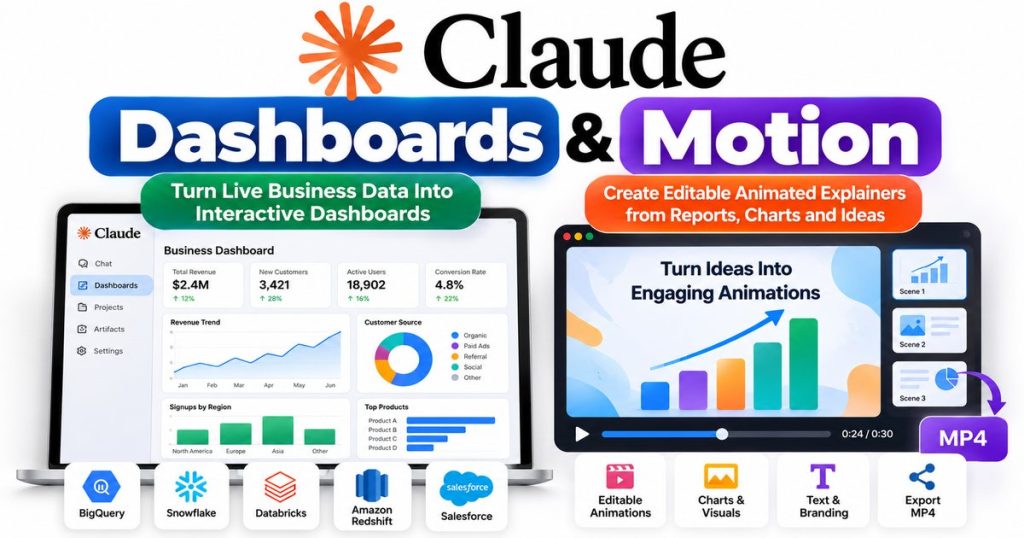
Claude Dashboards can connect to business-data platforms such as BigQuery, Snowflake, Databricks and Salesforce, answer questions about that data in natural language, and turn the results into dashboards that stay updated as the underlying information changes.
Claude Motion takes a different approach. It lets users turn reports, charts and ideas into editable animated explainers that can be exported as MP4 video.
Both features were announced on October 8, 2026. Claude Dashboards is currently in beta on paid Claude plans, while Claude Motion is in beta for Team and Enterprise customers. Anthropic also announced that Claude Docs, Slides and Design have moved out of beta and are available across all Claude plans, including Free.
For businesses already exploring AI agents and workflow automation, this is another sign that AI assistants are becoming full productivity platforms rather than simple chatbots. Readers interested in that broader shift can also see our AI Agents for Small Business guide.
Claude Dashboards and Motion at a Glance
| Feature | Claude Dashboards | Claude Motion |
|---|---|---|
| Developer | Anthropic | Anthropic |
| Announced | October 8, 2026 | October 8, 2026 |
| Current status | Beta | Beta |
| Availability | Paid Claude plans | Team and Enterprise |
| Main purpose | Live data dashboards | Animated explainers |
| Natural-language creation | Yes | Yes |
| Editable output | Yes | Yes |
| Export options | Share or send to analytics tools | MP4 |
| Uses connected business data | Yes | Can use reports, charts and content |
| Requires a video-generation model | No | No |
Anthropic’s official announcement is available through its Claude Dashboards and Motion announcement.
What Is Claude Dashboards?
Claude Dashboards is an AI-powered data-analysis feature that lets users ask questions about connected business data and receive a visual dashboard instead of only a written response.
Traditionally, answering a business question such as:
“How did this week’s signups compare with last month?”
might require:
- writing SQL;
- creating a report;
- opening a business-intelligence platform;
- selecting charts;
- and manually updating the dashboard later.
Claude Dashboards is designed to reduce those steps.
Anthropic says users can connect supported data systems, ask Claude a question in natural language, and have Claude retrieve the relevant information and build a dashboard automatically.
This moves Claude closer to the persistent workplace-agent model that companies such as Google and Microsoft are also developing.
For comparison, our Google Gemini Agent for Work guide explains how Google’s enterprise agent can work across Workspace and connected business systems.
Which Data Platforms Work With Claude Dashboards?
Anthropic specifically lists several data platforms that can work with Claude Dashboards, including:
- Amazon Redshift
- Google BigQuery
- ClickHouse
- Databricks
- Snowflake
Claude can also use other supported connectors.
For example, Anthropic says a company could connect Salesforce and ask Claude to build a dashboard showing sales opportunities.
That makes the feature relevant to teams working with:
- sales data;
- website analytics;
- customer information;
- product usage;
- financial reporting;
- marketing performance;
- operational metrics;
- and other structured business information.
Claude Dashboards Can Stay Updated Automatically
One of the most useful aspects of Claude Dashboards is that the dashboard does not have to remain a static snapshot.
Anthropic says Claude can keep the dashboard current as the connected data changes.
That creates an important distinction between asking Claude to create a one-time chart and creating a live dashboard.
A static chart might answer:
“How many customers signed up last month?”
A live dashboard could instead continue showing updated signup numbers as new data arrives.
This could be especially useful for recurring business monitoring.
Businesses already exploring automated reporting may also find our AI automation services guide useful for understanding how AI can be combined with recurring workflows.
Can You See How Claude Calculated the Numbers?
Yes.
Anthropic says users can click individual dashboard numbers to inspect the underlying query used to produce them.
Users can also ask Claude to explain the query.
Each chart shows when its information was last refreshed.
This is an important feature because AI-generated analytics should not be treated as automatically correct simply because the output looks professional.
Being able to inspect the source query gives users another way to verify:
- which data was selected;
- how information was grouped;
- what filters were applied;
- and whether the resulting metric matches the intended question.
For important financial or operational decisions, human review should still remain part of the process.
Does Claude Dashboards Replace Tableau or Other BI Tools?
Not necessarily.
Anthropic explicitly positions Claude Dashboards as working alongside existing analytics and business-intelligence platforms rather than replacing all of them.
Dashboards are particularly suited to quick exploratory questions.
When users need deeper analysis, Anthropic says a Claude dashboard can be sent to supported platforms including:
- Amplitude
- Grafana
- Hex
- Mixpanel
- Omni
- Perplexity
- PostHog
- Sigma
Anthropic says additional integrations including Databricks Genie, Looker, monday.com and Tableau are planned.
The practical model is therefore:
Ask Claude → Generate dashboard → Explore data → Move into specialist analytics software when needed
That could be faster than beginning every question inside a full BI platform.
What Is Claude Motion?
Claude Motion is Anthropic’s new feature for creating animated explainers from natural-language instructions.
A user can ask Claude to take existing information and turn it into a short animation.
Anthropic gives examples such as:
- turning a quarterly report into a 30-second all-hands explainer;
- adding motion to a chart for a board presentation;
- creating a product walkthrough;
- and building animated onboarding material.
Instead of manually building every movement in traditional animation software, users describe what they want Claude to create.
Claude produces an initial version that can then be edited.
Claude Motion Does Not Generate Traditional AI Video
This distinction is important.
Claude Motion is not primarily a text-to-video generator in the same sense as generative-video systems that create realistic footage.
Anthropic says Claude Motion generates animations by writing code that animates elements including:
- text;
- charts;
- shapes;
- and images.
Because the animation is code-based, individual elements remain editable.
Users can change:
- words;
- numbers;
- visual elements;
- animation timing;
- and other components.
Anthropic specifically says Motion does not use a video-generation model and therefore does not automatically create AI-generated footage or AI-generated people.
Can Claude Motion Export MP4 Video?
Yes.
Once Claude generates the animation, users can adjust it inside the editor or ask Claude to make changes conversationally.
The finished animation can then be downloaded as an MP4 file.
This makes Motion potentially useful for:
- presentations;
- internal company updates;
- social-media explainers;
- product demonstrations;
- training material;
- customer onboarding;
- marketing content;
- and educational videos.
Claude Motion Works With Other Creative Tools
Anthropic does not position Motion as the final step for every professional video project.
The company says users can move their work into other creative tools when they need additional capabilities.
Anthropic currently lists integrations or workflows involving:
- Adobe
- Descript
- HeyGen
- Higgsfield
- InVideo
- Luma AI
- Runway
It also says Canva and Captions support is coming.
This means Claude can potentially create the first animated explanation, while specialist creative software handles more advanced production.
Claude Docs, Slides and Design Are Now Out of Beta
The October update was broader than Dashboards and Motion.
Anthropic also announced that Claude Docs, Claude Slides and Claude Design are no longer in beta.
These features are now available on every Claude plan, including Free.
Anthropic says users have created more than 45 million documents, decks and designs using these tools since their introduction.
That number illustrates how aggressively Claude is expanding beyond a traditional chat interface.
Claude increasingly supports complete work products such as:
- documents;
- presentations;
- designs;
- dashboards;
- animations;
- code;
- and agent-driven workflows.
This broader trend is also visible in Microsoft’s AI strategy. Our Microsoft Copilot Autopilot guide explains how Microsoft is moving toward persistent AI agents capable of continuing work in the background.
Can Claude Export to PowerPoint and Google Slides?
Yes.
Anthropic says Claude’s document and presentation tools support exports designed to preserve formatting.
For presentations, users can export to PowerPoint and can also send decks directly to Google Slides as editable files.
This is useful because an AI-generated presentation does not necessarily need to remain trapped inside Claude.
A team can generate a first version with Claude and then continue editing it using conventional workplace software.
Can Multiple People Edit Claude Content?
Anthropic says teams can collaborate with Claude on the same:
- document;
- deck;
- design;
- or dashboard.
Organizations can also share dashboards, presentations, designs and animations outside their organization when administrators permit external sharing.
This matters for enterprise use because collaborative AI output becomes considerably more useful when it can participate in an existing team workflow rather than functioning only as a private chatbot session.
Does Claude Work on Mobile?
Anthropic says users can edit Docs, Slides and Design from the Claude mobile app.
Dashboards and Motion have more limited beta availability, so functionality can depend on plan, organization settings and current rollout status.
Users should check Claude’s current interface for the exact capabilities available to their account.
How to Use Claude Dashboards
Using Claude Dashboards is designed to be relatively straightforward.
Step 1: Connect Your Data Source
Connect a supported data platform or business tool.
Examples include Snowflake, BigQuery, Databricks or Salesforce.
Step 2: Ask a Business Question
Instead of writing a query manually, ask Claude something like:
“Build a dashboard showing quarterly revenue by region.”
Step 3: Let Claude Build the Dashboard
Claude retrieves relevant information and creates charts and metrics.
Step 4: Verify the Data
Click figures to inspect the queries behind them and review when each chart was last refreshed.
Step 5: Refine the Dashboard
Ask Claude to change the visualization, add a metric or explain an unusual result.
Step 6: Share or Continue Analysis
Share the dashboard with colleagues or move the analysis into a supported BI platform when deeper investigation is required.
Anthropic provides the official feature overview in its Claude Dashboards documentation and announcement. Claude
How to Use Claude Motion
Claude Motion follows a similarly conversational workflow.
Step 1: Open Claude
Start a conversation containing the information you want to explain.
Step 2: Request an Animation
For example:
“Turn this quarterly report into a 30-second animated explainer.”
Anthropic says users can also invoke Motion from the Claude interface.
Step 3: Review the Animation
Claude generates an initial version.
Step 4: Ask for Changes
You can request changes to wording, timing, numbers and presentation.
Step 5: Edit Manually if Needed
Because the animation is code-based, elements remain editable.
Step 6: Export the Result
Download the finished animation as an MP4 file.
Who Can Use Claude Dashboards?
Claude Dashboards is currently available in beta on paid Claude plans.
Anthropic has not described it as a general Free-plan feature in its October 8 announcement.
Availability may also depend on organizational administrator settings.
For Enterprise organizations, Anthropic says Dashboards and Motion are off by default and administrators can enable them from the Artifacts settings.
Who Can Use Claude Motion?
Claude Motion currently has more restrictive availability.
Anthropic says Motion is in beta for:
- Team
- Enterprise
users.
That means individual Free or standard paid subscribers should not assume they currently have access to Motion simply because they can use other Claude artifact features.
Availability could expand later.
Claude Dashboards vs Google Gemini Agent for Work
Claude Dashboards and Google’s latest enterprise AI push overlap in some areas, but they are not identical products.
Claude Dashboards
Focuses heavily on:
- asking questions about connected data;
- generating visual dashboards;
- inspecting underlying queries;
- and moving analysis into BI platforms.
Gemini Agent for Work
Google’s broader enterprise agent is designed to:
- search organizational information;
- work across Workspace;
- create content;
- use tools;
- run code;
- and complete multi-step tasks across connected business systems.
For a deeper look at Google’s approach, see our Google Gemini Agent for Work article.
The larger pattern is clear: leading AI companies increasingly want their assistants to become interfaces for workplace data and software.
Claude Dashboards vs Traditional Business Intelligence
Claude Dashboards may lower the barrier to answering relatively simple data questions.
Traditional BI tools often require users to understand:
- data schemas;
- filters;
- SQL;
- dashboard configuration;
- and visualization settings.
Claude can potentially translate a natural-language question into much of that work.
However, traditional BI platforms remain important for:
- governed reporting;
- large enterprise deployments;
- complex analytics;
- regulatory requirements;
- advanced visualization;
- and highly controlled metrics.
Claude Dashboards therefore looks more like an AI layer over business data than a universal replacement for analytics infrastructure.
Why These Features Matter
Claude Dashboards and Motion represent a broader shift in generative AI.
Early AI assistants primarily returned text.
Modern systems increasingly return finished artifacts.
A prompt can now potentially become:
- a document;
- a spreadsheet;
- a presentation;
- a dashboard;
- an animation;
- an application;
- or an automated workflow.
That reduces the distance between:
asking AI for advice
and
asking AI to produce the actual work.
For small businesses, this could make sophisticated analytics and content production accessible without requiring a specialist for every small task.
Our AI Agents for Small Business guide covers additional practical examples of this shift.
What Are the Limitations?
Claude Dashboards and Motion are useful, but users should keep several limitations in mind.
Dashboards Can Still Be Wrong
If the AI selects an incorrect field, query or interpretation, the resulting dashboard may also be wrong.
Users should inspect important calculations.
Data Access Must Be Managed Carefully
Connecting AI to business databases creates security and privacy considerations.
Organizations should limit access according to employee roles and company policy.
Motion Is Not Generative Video
Users looking for photorealistic AI video generation need a different category of tool.
Claude Motion focuses on editable coded animations.
Availability Is Limited
Dashboards remains a paid-plan beta, while Motion currently requires Team or Enterprise.
Enterprise Settings Matter
Organization administrators may control whether these features are available.
Frequently Asked Questions
What is Claude Dashboards?
Claude Dashboards is an Anthropic feature that lets users connect supported business-data sources, ask questions in natural language and have Claude create visual dashboards from the results.
Is Claude Dashboards free?
Anthropic says Claude Dashboards is currently in beta on paid plans.
What databases work with Claude Dashboards?
Anthropic lists Amazon Redshift, BigQuery, ClickHouse, Databricks and Snowflake among supported data-platform examples. Other connectors such as Salesforce can also be used.
Does Claude Dashboards update automatically?
Anthropic says dashboards can remain current as connected data changes. Each chart also displays when its information was last refreshed.
What is Claude Motion?
Claude Motion is a feature that turns prompts, charts, reports and other information into editable animated explainers.
Does Claude Motion generate AI video?
Not in the conventional text-to-video sense.
Anthropic says Motion writes code to animate text, charts, shapes and images rather than using a generative-video model.
Can Claude Motion export MP4 files?
Yes. Anthropic says finished Motion animations can be downloaded as MP4 video files.
Is Claude Motion available to free users?
Not currently according to Anthropic’s October 8 announcement. Motion is in beta for Team and Enterprise.
Are Claude Docs and Slides free?
Anthropic says Docs, Slides and Design are now available on every Claude plan, including Free.
Can Claude export presentations to PowerPoint?
Yes. Anthropic says presentation exports preserve formatting, and decks can also be sent to Google Slides as editable files.
Claude Dashboards and Claude Motion push Anthropic further beyond the traditional chatbot model.
Claude Dashboards lets paid users connect business data, ask questions in natural language and generate dashboards that can stay current as the source data changes.
Claude Motion gives Team and Enterprise customers a way to turn reports, charts and ideas into editable animated explainers that can be exported as MP4 video.
At the same time, Docs, Slides and Design are now out of beta and available across all Claude plans, including Free.
For businesses, the larger significance is that Claude increasingly works as a creation and analysis environment, not simply an AI that returns text.
That puts Anthropic into closer competition with platforms such as Google’s Gemini for Work and Microsoft’s expanding Copilot ecosystem.
For more on that competition, read our Google Gemini Agent for Work guide and Microsoft Copilot Autopilot guide.