ChatGPT Work Is Coming to Regular Chat: OpenAI Doubles Pro Limits & Changes Codex Usage
ChatGPT Work Is Coming to Regular Chat
OpenAI is preparing a major change to how people use ChatGPT.
Instead of forcing users to choose between a normal conversation and a separate agentic workspace every time a task becomes complicated, OpenAI says it is beginning to bring the agentic capabilities of ChatGPT Work into the main ChatGPT experience.
The change is accompanied by an important overhaul to usage limits.
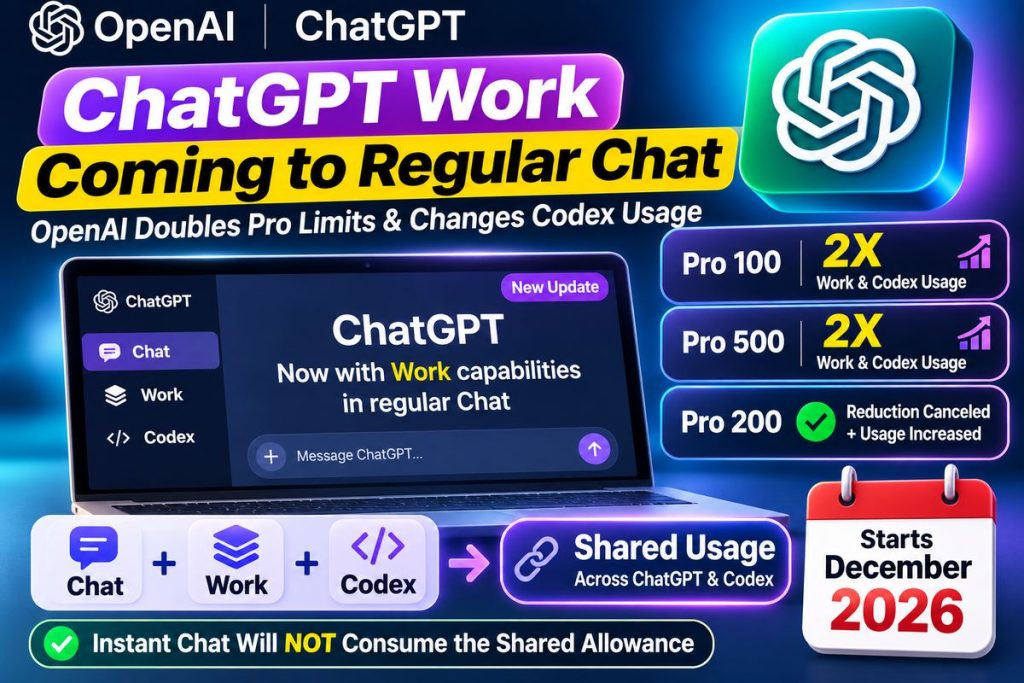
Starting in December 2026, OpenAI says usage allowances for eligible Plus, Pro and Business plans will be shared across ChatGPT and Codex for supported agentic work.
At the same time, OpenAI has increased Work and Codex capacity for several Pro plans.
According to OpenAI’s official ChatGPT release notes, beginning October 29:
- Pro 100 received 2X its previous Work and Codex allowance;
- Pro 500 received 2X its previous Work and Codex allowance;
- OpenAI reversed the previously announced reduction affecting existing Pro 200 subscribers;
- affected Pro 200 users on the lower allowance received twice that lower allowance.
There is another important piece of good news:
Instant Chat will not consume the new shared agentic allowance.
That means ordinary quick ChatGPT conversations will remain separate from the heavier usage generated by complex Work and Codex tasks.
Here is exactly what is changing, how the new usage system works and what it means for Plus, Pro and Business subscribers.
What Is ChatGPT Work?
ChatGPT Work is OpenAI’s agentic environment for completing longer, multi-step tasks.
Regular Chat is designed primarily for fast conversational assistance.
You might use Chat to:
- ask a question;
- brainstorm an idea;
- rewrite a paragraph;
- search for information;
- summarize something.
Work is designed for a different type of request.
Instead of asking:
“How should I analyze this market?”
you can increasingly ask:
“Research the market, compare the major companies, analyze these files and create a finished presentation.”
OpenAI’s official ChatGPT Work and Codex documentation says Work can research topics, analyze information and create finished:
- documents;
- spreadsheets;
- presentations;
- reports;
- Sites.
For a deeper look at how OpenAI’s highest-capability models handle these workflows, see our guide to GPT-6 Astra for Work.
Is ChatGPT Work Being Merged Into Regular Chat?
Not completely—at least not yet.
OpenAI still officially describes Chat and Work as distinct experiences.
Chat remains optimized for:
fast conversational assistance.
Work remains optimized for:
longer, multi-step tasks and finished deliverables.
However, OpenAI says it is bringing Work’s agentic capabilities into the main ChatGPT experience.
That suggests the boundary between:
talking to ChatGPT
and:
asking ChatGPT to perform substantial work
will become less noticeable.
The long-term direction appears to be:
start with a conversation, then let ChatGPT move into deeper execution when the task requires it.
ChatGPT Is Moving From Answers to Actions
This is the larger trend behind the update.
The first generation of ChatGPT mainly answered questions.
A user asked:
“How do I make a quarterly business review?”
ChatGPT explained the steps.
Agentic ChatGPT increasingly moves toward:
“Create the quarterly business review for me.”
That workflow might involve:
Research → Analyze → Create → Review → Deliver
This transition is closely related to what we explain in our guide to What Is Agentic AI?.
Agentic AI systems can continue working toward an objective instead of producing only a single response.
What Changes in December 2026?
Starting in December, OpenAI says eligible:
- Plus;
- Pro;
- Business
plans will begin using a shared allowance across ChatGPT and Codex as Work capabilities become integrated more deeply into ChatGPT.
OpenAI explains the change in its official ChatGPT and Codex usage-limit documentation.
Usage will be measured primarily according to:
tokens processed and generated.
That means the amount of allowance consumed depends on:
- which model you use;
- the amount of context;
- reasoning complexity;
- files;
- tools;
- task length;
- generated output.
A five-minute request and a two-hour research workflow should not be expected to consume the same amount.
What Is a Token?
Tokens are units AI systems use to process information.
A short question requires relatively few tokens.
A long task involving:
- multiple documents;
- hundreds of thousands of tokens of context;
- web research;
- reasoning;
- coding;
- tool calls;
- long outputs
can use substantially more.
This is why OpenAI says it cannot reduce Work usage to a simple promise such as:
“You receive exactly 500 tasks per month.”
The cost of individual tasks can be dramatically different.
Does Instant Chat Use the Shared Allowance?
No.
This is one of the most important details in the announcement.
OpenAI says:
Instant Chat will not draw from the shared usage allowance.
So normal quick conversations will not necessarily compete directly with your Work and Codex allowance.
For example, asking:
“Rewrite this sentence professionally.”
should not be treated the same way as:
“Analyze these 20 files, research our competitors and create a finished strategy presentation.”
The second task requires significantly more computation.
OpenAI Doubled Work and Codex Usage for Pro 100
OpenAI’s October 29 release notes confirm that:
Pro 100 now includes twice its previous Work and Codex allowance.
Pro 100 currently costs:
$100 per month.
It is designed for users who need substantially more AI usage than a standard consumer plan.
The increase is especially useful for people using ChatGPT for:
- coding;
- business research;
- document creation;
- analysis;
- long-running workflows.
Pro 500 Also Gets 2X Work and Codex Usage
OpenAI also doubled the Work and Codex allowance included with:
Pro 500.
Pro 500 costs:
$500 per month
and provides the highest included usage among OpenAI’s current Pro plans.
It also includes access to:
Astra Ultrafast.
OpenAI’s official Pro plan documentation confirms that current monthly Pro tiers are:
| Plan | Monthly price |
|---|---|
| Pro 100 | $100 |
| Pro 200 | $200 |
| Pro 500 | $500 |
Pro 500 includes the highest Pro usage allowance and Ultrafast support.
What Happened With Pro 200?
The Pro 200 situation is slightly more complicated.
OpenAI previously announced a reduction in Work and Codex allowance for certain existing Pro 200 customers.
Its October 29 release notes say that reduction was canceled.
OpenAI says subscribers already receiving the higher allowance kept it, while affected Pro 200 subscribers who were on the lower allowance received:
2X their previous lower allowance
bringing them back to the same higher limit.
However, OpenAI’s current Pro-tier documentation also notes that newly purchased Pro 200 subscriptions can have different included usage depending on eligibility and grandfathering.
For that reason, Pro 200 users should check:
Settings → Usage
rather than assume another user’s allowance is identical to theirs.
What Is Astra Ultrafast?
Astra Ultrafast is a lower-latency service tier available with Pro 500 and certain eligible enterprise deployments.
OpenAI currently says Ultrafast can be used with models including:
- GPT-6 Astra;
- GPT-6.1 Sol.
But faster responses consume allowance more quickly.
OpenAI says Ultrafast currently consumes included usage at:
8X the Standard rate
for the supported model.
So Ultrafast is useful when speed matters, but it can burn through included usage considerably faster.
ChatGPT Plus and GPT-6 Astra
ChatGPT Plus users can access GPT-6 Astra through:
ChatGPT Work
and:
Codex
where available.
However, that should not be confused with GPT-6 Pro availability in normal Chat.
OpenAI’s current Work documentation says:
Plus includes GPT-6 Astra in Work and Codex.
GPT-6 Pro in standard Chat is currently available on eligible higher-tier plans.
We explain this distinction in detail in our GPT-6 Astra Usage Limits guide.
Work Is Not the Same Thing as GPT-6 Astra
This distinction is worth understanding.
GPT-6 Astra
A frontier AI model.
ChatGPT Work
A product environment where AI models can combine reasoning with:
- files;
- browser access;
- connected apps;
- computer interaction;
- longer task execution;
- finished artifact creation.
An easy way to remember it is:
Model = intelligence
Work = environment where that intelligence performs tasks
Work can use several supported models depending on your plan and account.
Which Models Are Available in Work and Codex?
OpenAI’s current documentation lists models including:
- GPT-6.1 Sol;
- GPT-6.1 Terra;
- GPT-6 Sol;
- GPT-6 Luna.
GPT-6 Astra is also available to eligible Work and Codex users.
Availability depends on:
- subscription;
- account rollout;
- workspace settings;
- administrator controls.
OpenAI specifically notes that some Work/Codex models are not available in ordinary Chat conversations.
What Is GPT-6.1 Terra?
GPT-6.1 Terra began rolling out to ChatGPT Work and Codex in late October.
OpenAI describes Terra as supporting tasks including:
- visual reasoning;
- computer use;
- writing.
It is available to eligible paid users depending on rollout and workspace settings.
The addition of Terra reinforces OpenAI’s strategy of giving Work access to different models optimized for different types of professional tasks.
What Happens to Codex?
Codex is not disappearing.
OpenAI continues to describe Codex as its dedicated experience for software development and technical work.
Codex can help developers:
- work with repositories;
- write code;
- debug;
- run tests;
- run terminal commands;
- review changes;
- work with local development tools.
The major change is that Codex usage will increasingly share the same allowance infrastructure as supported ChatGPT agentic work.
For another recent Codex feature, see our guide to Codex Composer Predictions.
What Does Shared ChatGPT and Codex Usage Mean?
Imagine your plan includes a certain amount of agentic usage.
You spend much of Monday using Codex to:
- inspect a repository;
- implement features;
- debug software;
- run tests.
Then on Tuesday you use ChatGPT Work to:
- research competitors;
- analyze spreadsheets;
- build a presentation.
Under the new system, those supported workloads can increasingly draw from the:
same combined allowance.
That means heavy Codex usage may leave less capacity for Work later in the usage period—and vice versa.
How Can You See Your Remaining Usage?
OpenAI says users will be able to monitor the combined allowance through:
Settings → Usage
The usage area can show information such as:
- remaining allowance;
- reset timing;
- available credits;
- usage history.
This becomes more important once ChatGPT and Codex begin drawing from the same pool.
What Happens When You Reach the Limit?
OpenAI says eligible users may have several choices.
You can:
- wait for your allowance to reset;
- use another available feature or model;
- upgrade;
- purchase additional credits where supported.
Credits can be used for certain agentic products after included plan usage is exhausted.
OpenAI currently lists eligible credit-supported products including:
- ChatGPT Work;
- Codex;
- ChatGPT for Word;
- ChatGPT for Excel;
- ChatGPT for PowerPoint.
Credit availability depends on your plan and account.
Can You Buy More ChatGPT Work Usage?
For eligible users:
yes.
Your subscription allowance is consumed first.
After that, supported tasks can draw from a purchased credit balance.
However, buying credits does not make every ChatGPT feature unlimited.
Credits apply only to supported products and services.
Work Can Create Finished Deliverables
One of the biggest reasons ChatGPT Work matters is that it can produce actual work artifacts.
OpenAI says Work can create:
- documents;
- spreadsheets;
- presentations;
- reports;
- Sites.
That represents a major shift from traditional ChatGPT.
Instead of asking:
“Give me an outline for a presentation.”
you can increasingly ask:
“Create the presentation.”
For a practical example, see our guide to ChatGPT Slides, which explains how ChatGPT can create editable presentations and export them to PowerPoint, PDF and Google Slides.
ChatGPT Data Agent Fits Into the Same Strategy
Another example is the ChatGPT Data Agent.
The Data Agent is designed to help employees work directly with connected business information.
Instead of manually:
- exporting databases;
- writing SQL;
- creating charts;
- building dashboards,
a user can ask questions in natural language and allow the agent to investigate relevant data.
The broader OpenAI direction is therefore becoming clearer:
conversation → data → tools → actions → finished output.
Work Can Use Connected Apps
Work can use connected apps where supported and authorized.
That allows workflows involving information stored across different business systems.
For example:
“Review these project documents, compare them against our latest data and create an executive report.”
The AI can potentially combine information rather than requiring the user to manually copy everything into one prompt.
This makes permissions increasingly important.
Why Permissions Matter More With AI Agents
A chatbot that can only generate text has limited ability to cause external changes.
An agent with access to:
- files;
- email;
- websites;
- business systems;
- repositories;
- cloud environments
can potentially do much more.
Organizations should therefore follow the principle of:
least privilege.
An AI that only needs to read sales data should not automatically receive permission to:
- delete files;
- approve payments;
- change user accounts;
- modify production systems.
The move toward Work-style AI increases productivity—but also increases the importance of access control.
Work vs Regular Chat
| Feature | Regular Chat | ChatGPT Work |
|---|---|---|
| Quick questions | Best fit | Supported |
| Brainstorming | Yes | Yes |
| Search | Yes | Yes |
| Multi-step autonomous tasks | Limited | Core use |
| Documents | Assistance | Can create finished output |
| Spreadsheets | Assistance | Can create/analyze |
| Presentations | Assistance | Can create |
| Browser/computer tasks | Limited by experience | Supported where available |
| Connected app workflows | Limited | Major use case |
As OpenAI integrates more Work capability into ChatGPT, these boundaries may become less visible.
Work vs Codex
| Feature | Work | Codex |
|---|---|---|
| General research | Yes | Technical focus |
| Documents | Yes | Not primary focus |
| Spreadsheets | Yes | Not primary focus |
| Presentations | Yes | Not primary focus |
| Coding | Yes | Core specialty |
| Repositories | Possible workflows | Core specialty |
| Terminal commands | Limited by environment | Core capability |
| Long-running tasks | Yes | Yes |
Codex remains the better specialized environment for software-development workflows.
Work is broader.
Does This Mean ChatGPT Is Becoming an AI Operating System?
Not literally.
But the product direction resembles an increasingly unified AI workspace.
A user can potentially begin with:
a conversation
then move into:
research
then:
files
then:
apps
then:
analysis
and finally:
a finished deliverable.
The user no longer has to manually move every piece of information between separate applications.
That is a major reason agentic AI is attracting so much attention.
Will ChatGPT Work Replace Employees?
Not in a simple one-to-one way.
Work is better viewed as an automation layer.
It can potentially reduce time spent on tasks such as:
- research;
- reporting;
- document preparation;
- data analysis;
- software development;
- repetitive administration.
But consequential professional work still requires:
- human judgment;
- verification;
- accountability;
- domain expertise;
- approvals.
The more actions AI is allowed to perform, the more important oversight becomes.
Important Dates to Know
October 29, 2026
OpenAI announced increased Work and Codex allowances for Pro 100 and Pro 500 and changes affecting Pro 200.
December 2026
OpenAI says eligible Plus, Pro and Business usage allowances will begin being shared across ChatGPT and Codex as Work capabilities move further into the main ChatGPT experience.
Instant Chat
OpenAI says Instant Chat will not consume the shared usage allowance.
ChatGPT Work Update at a Glance
| Change | Status |
|---|---|
| Work capabilities moving into main ChatGPT experience | Starting |
| Pro 100 Work/Codex allowance | 2X previous allowance |
| Pro 500 Work/Codex allowance | 2X previous allowance |
| Shared ChatGPT + Codex usage | Starts December 2026 |
| Instant Chat uses shared allowance | No |
| Usage measured mainly in tokens | Yes |
| Remaining usage shown in Settings | Yes |
| Codex discontinued | No |
| Work discontinued | No |
Frequently Asked Questions
Is ChatGPT Work coming to regular Chat?
OpenAI says it is bringing the agentic capabilities of Work into the main ChatGPT experience.
Chat and Work are still separately documented today, but the experiences are becoming more integrated.
Is ChatGPT Work disappearing?
No.
OpenAI still officially supports Work as a dedicated environment for longer multi-step tasks.
Did OpenAI double Pro usage?
OpenAI doubled the included Work and Codex allowance for Pro 100 and Pro 500 on October 29.
It also changed the previously announced Pro 200 reduction for affected existing subscribers.
When will ChatGPT and Codex share usage limits?
OpenAI says the transition starts in:
December 2026.
Does regular Chat count against the new allowance?
OpenAI says:
Instant Chat will not draw from the shared usage allowance.
Is Codex being merged into ChatGPT?
Codex remains a separate software-development experience.
Its usage allowance will increasingly be shared with supported ChatGPT agentic workflows.
Does ChatGPT Plus include Work?
Work is available to eligible paid users, including Plus, subject to rollout and plan availability.
Does Plus get GPT-6 Astra?
Plus includes GPT-6 Astra through Work and Codex where available.
Does Plus get GPT-6 Pro in normal Chat?
OpenAI currently lists GPT-6 Pro in standard Chat for eligible higher-tier plans rather than Plus.
How can I check my ChatGPT usage?
Go to:
Settings → Usage
What happens if my allowance runs out?
You can wait for the reset, use another available model or feature, upgrade, or buy credits for eligible features where available.
How much does Pro 100 cost?
$100 per month.
How much does Pro 200 cost?
$200 per month.
How much does Pro 500 cost?
$500 per month.
Which Pro tier includes Astra Ultrafast?
Pro 500 currently includes Astra Ultrafast.
Is ChatGPT Work an AI agent?
Yes. OpenAI describes Work as an agent designed for longer, multi-step work and finished deliverables.
Bottom Line
ChatGPT is moving toward a more unified experience where the difference between:
asking a question
and:
delegating a task
becomes smaller.
OpenAI says it is bringing the agentic capabilities of Work into the main ChatGPT experience.
At the same time, usage is being reorganized.
Starting in:
December 2026
eligible Plus, Pro and Business plans will begin using a shared usage allowance across ChatGPT and Codex for supported agentic work.
OpenAI says:
Instant Chat will not consume that allowance.
The company has also increased Work and Codex capacity for several Pro users.
Pro 100 now receives:
2X its previous Work and Codex allowance.
Pro 500 also receives:
2X its previous allowance.
The larger change, however, is not simply about limits.
It is about what ChatGPT is becoming.
The old model was:
ChatGPT answers the question.
The newer model increasingly becomes:
ChatGPT researches the problem, works across tools and files, performs multiple steps and produces the finished result.
That is why the integration of Work into the broader ChatGPT experience may ultimately matter more than any individual usage-limit increase.
The future of ChatGPT is increasingly not just:
“What can the AI tell me?”
It is:
“What can the AI actually complete for me?”