OpenAI Codex Composer Predictions: How It Works, Availability, Cost and Supported Models
OpenAI Codex Composer Predictions: How It Works, Availability, Cost and Supported Models
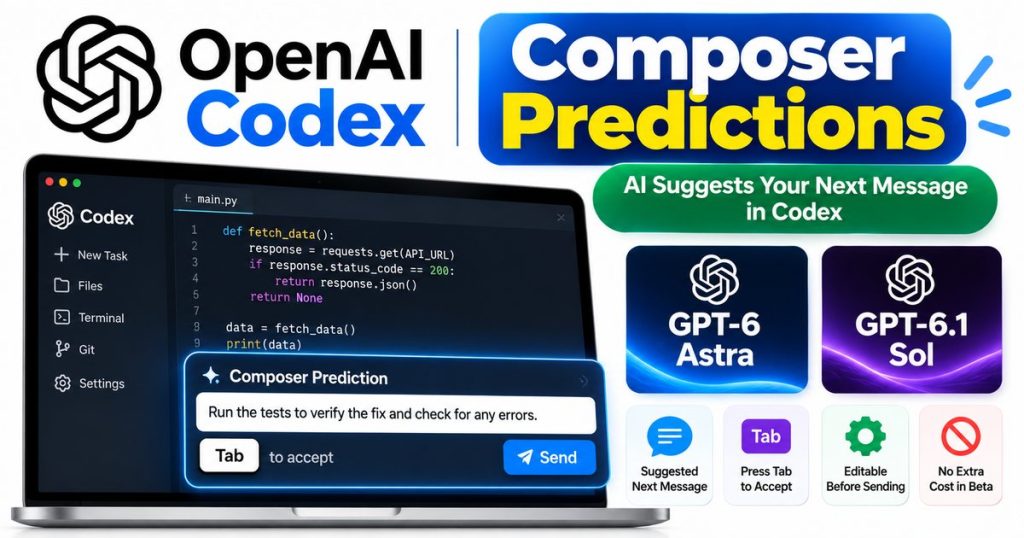
OpenAI has added a new Composer Predictions feature to Codex that can suggest what you may want to tell the coding agent next.
Instead of requiring users to manually write every follow-up instruction, Codex can analyze the conversation in the current thread and place a suggested next message directly into the composer after it finishes responding.
Users can then press Tab to accept the suggestion, edit it if necessary and decide whether to send it.
Importantly, accepting a prediction does not automatically send the message.
OpenAI launched Composer Predictions in beta on October 9, 2026 for eligible adult users on personal ChatGPT Pro plans. The feature currently works in the Codex desktop app with GPT-6 Astra and GPT-6.1 Sol in supported local and SSH threads.
Here is how Codex Composer Predictions works, who can use it, whether predictions consume your Codex allowance, how context and memory affect suggestions, and how to turn the feature off.
Codex Composer Predictions at a Glance
| Feature | Current Details |
|---|---|
| Developer | OpenAI |
| Feature | Composer Predictions |
| Release | October 9, 2026 |
| Status | Beta |
| Main purpose | Suggest the next message in a Codex thread |
| Required plan | Personal ChatGPT Pro |
| Minimum age | 18 |
| App | Codex desktop app |
| Local threads | Supported |
| SSH threads | Supported |
| GPT-6 Astra | Supported |
| GPT-6.1 Sol | Supported |
| Accept shortcut | Tab |
| Sends automatically | No |
| Prediction generation cost | No additional cost during beta |
| Uses Codex allowance | No, prediction generation does not |
| Sent follow-up messages | Normal usage rules apply |
| Enabled by default | Yes for eligible users |
OpenAI’s official documentation confirms these availability and usage conditions.
What Is Codex Composer Predictions?
Composer Predictions is a Codex feature that attempts to predict the next complete message a user may want to send based on the current coding conversation.
After Codex finishes responding, a suggested follow-up can appear inside the message box.
The prediction is based on what has already happened in the thread.
For example, imagine asking Codex to:
“Find the cause of these failing authentication tests.”
After analyzing the project and explaining the issue, Composer Predictions might determine that a reasonable next instruction would involve fixing the problem, running the tests again or reviewing another related file.
The exact prediction depends on the conversation.
OpenAI also makes clear that a prediction does not appear after every response. Codex can choose not to display one when the system does not identify an appropriate next suggestion.
How Composer Predictions Works
The workflow is simple.
Step 1: Give Codex a Task
Start a supported local or SSH Codex thread and send an instruction as usual.
For example:
“Review this function and identify why it fails when the API returns an empty response.”
Step 2: Codex Completes Its Response
Codex analyzes the task and returns its result.
Step 3: A Prediction May Appear
After the response is finished, Composer Predictions may place a suggested next message inside the composer.
Step 4: Press Tab
Press Tab to accept the suggestion.
The text is added to the message field.
Step 5: Review or Edit It
You can:
- send the message unchanged;
- edit part of it;
- completely rewrite it;
- or ignore it.
Step 6: Send Only When Ready
The prediction does not automatically execute.
You must still deliberately send the message yourself.
This human-confirmation step is important because OpenAI warns that predictions may not always match the user’s actual intention.
Which ChatGPT Plans Get Composer Predictions?
During the current beta, OpenAI says Composer Predictions is available to:
personal ChatGPT Pro users
who are:
18 years old or older
in supported regions.
This means users should not assume that having general access to Codex automatically guarantees access to Composer Predictions.
Eligibility currently depends on:
- account type;
- subscription;
- age;
- Codex desktop version;
- selected model;
- and thread type.
Because this is a beta feature, OpenAI may change availability later.
Which Models Support Composer Predictions?
OpenAI currently lists two supported models:
GPT-6 Astra
GPT-6 Astra is OpenAI’s high-capability model for difficult coding, reasoning and agentic work.
Elite Era Trends already has a complete guide covering its pricing, context window, coding capabilities and availability:
Read: GPT-6 Astra Pricing, Features & Context Window
GPT-6.1 Sol
Composer Predictions also works with GPT-6.1 Sol.
Elite Era Trends recently covered GPT-6.1 Sol’s new Ultrafast API mode, including pricing and latency considerations:
Read: GPT-6.1 Sol Ultrafast Mode Guide
OpenAI says Composer Predictions currently supports these models in local and SSH threads.
What Is a Local Codex Thread?
A local thread lets Codex work with a development environment available on the user’s computer.
This type of workflow can be useful for tasks involving:
- local repositories;
- project files;
- code changes;
- debugging;
- tests;
- command-line operations;
- and iterative development.
Composer Predictions can appear after supported Codex interactions in these local threads when all beta requirements are met.
Does Composer Predictions Work Over SSH?
Yes.
OpenAI says the feature supports SSH threads in addition to local threads.
SSH workflows allow developers to work with remote machines or development environments rather than limiting Codex to the local computer.
That makes Composer Predictions potentially useful for developers working with:
- remote development servers;
- cloud machines;
- remote repositories;
- testing infrastructure;
- staging environments;
- and other SSH-accessible systems.
The supported model must still be GPT-6 Astra or GPT-6.1 Sol under the current beta.
Is Composer Predictions Available in Normal ChatGPT Chat?
No.
OpenAI’s current documentation states that Composer Predictions is not available in ordinary Chat on the web or desktop as part of this beta.
This is specifically a Codex-oriented feature.
That distinction matters because ChatGPT contains several different experiences.
A user may have access to GPT-6 in normal Chat while still not meeting the requirements for Composer Predictions inside Codex.
Does Composer Predictions Cost Extra?
During the beta, generating the prediction itself does not cost extra for eligible users.
OpenAI says prediction generation:
- does not count against Codex usage limits;
- and does not consume credits.
However, this does not mean the next Codex task is free.
Once you actually send the suggested message, the normal Codex usage and billing rules apply.
The distinction is:
Prediction appears → no Codex usage charge for generating the prediction during beta
You send that prediction as a real instruction → normal Codex usage applies
Users concerned about Astra usage can also see our detailed breakdown of current allowances:
Read: GPT-6 Astra Usage Limits Explained
Does Pressing Tab Automatically Run the Suggested Task?
No.
This is one of the most important details about the feature.
Pressing Tab only places the suggested text into the message composer.
It does not automatically send the instruction to Codex.
You can inspect the suggestion before anything happens.
OpenAI specifically recommends reviewing predictions because a suggestion may not reflect what you actually intend to do.
That provides a useful separation between:
AI suggesting an action
and
AI being authorized to execute that action.
Can You Edit a Composer Prediction?
Yes.
After pressing Tab, the prediction becomes editable text inside the composer.
You can:
- change individual words;
- add additional requirements;
- remove parts;
- replace it completely;
- or decline to send it.
You can also ignore the prediction entirely and begin typing your own follow-up.
OpenAI says users do not have to wait for a prediction before starting to type.
Is Composer Predictions the Same as Autocomplete?
Not exactly.
Traditional autocomplete generally predicts the next word or short sequence while the user is actively typing.
Composer Predictions works differently.
During the current beta, OpenAI says it suggests a complete next message after Codex finishes responding.
It does not continuously complete the sentence word by word while you type.
That makes it more similar to:
“What is the most likely useful next instruction?”
than:
“What word will the user type next?”
Composer Predictions vs Normal Codex Suggestions
OpenAI also distinguishes Composer Predictions from suggestions that can appear when starting a new conversation.
New-conversation suggestions
These help users decide what initial task to give Codex.
Composer Predictions
These attempt to suggest the next message inside an existing conversation after Codex has responded.
The difference is context.
A Composer Prediction is generated using the ongoing thread, so it can respond to what has already happened during the coding task.
How Does Composer Predictions Use Context?
Composer Predictions uses information already present in the current Codex thread.
That conversation can include:
- the user’s earlier instructions;
- Codex responses;
- relevant task context;
- and information already brought into that thread.
OpenAI says Composer Predictions does not independently go and retrieve new information from connected applications simply to generate a prediction.
Likewise, it does not independently search memory for new information while generating the suggestion.
However, information that is already present in the current thread can influence the prediction.
Do Composer Predictions Require ChatGPT Memory?
No.
OpenAI says Composer Predictions can work with memory turned off.
If relevant memory-derived context has already become part of the active thread, that existing context may influence predictions.
But the prediction system does not independently retrieve memories simply because it wants more information for a suggestion.
This provides an important distinction between:
using existing conversation context
and
actively searching for additional personal context.
Can Composer Predictions Access Connected Apps?
Not independently for prediction generation.
According to OpenAI, predictions do not retrieve information from connected applications on their own.
If information from a connected application is already inside the current conversation, however, it can become part of the thread context used by the prediction.
Developers handling sensitive code or company information should still follow their organization’s normal data-security and access policies.
Why Doesn’t a Prediction Appear Every Time?
A missing prediction does not necessarily mean the feature is broken.
OpenAI says the composer may choose to skip a prediction.
Predictions may also fail to appear if one of the feature requirements is not met.
Check:
- your ChatGPT plan;
- age eligibility;
- Codex desktop app version;
- selected model;
- thread type;
- and whether Composer Predictions is enabled.
Longer conversations may also take longer before a suggestion appears.
How Long Does a Composer Prediction Take?
OpenAI says predictions can take several seconds after Codex finishes responding.
They may take longer in particularly long conversations.
However, users do not have to wait.
You can begin typing your own follow-up immediately.
That prevents Composer Predictions from becoming a required pause in the coding workflow.
How to Turn Composer Predictions Off
Composer Predictions is enabled by default for eligible users during the beta.
To disable it:
1. Open the Codex desktop app
2. Open Settings
3. Select General
4. Find Composer
5. Turn off “Show predictions”
You can return to the same setting later and turn predictions back on.
Composer Predictions Not Showing? Try These Fixes
If the feature is missing, OpenAI recommends checking several things.
Update the Codex Desktop App
Make sure you are running the latest version.
Verify Your Account
The current beta requires an eligible personal ChatGPT Pro account for adults aged 18 or older.
Check Your Model
Use:
- GPT-6 Astra;
- or GPT-6.1 Sol.
Check the Thread Type
Use a supported:
- local thread;
- or SSH thread.
Check the Setting
Go to:
Settings → General → Composer
and verify that:
Show predictions
is enabled.
Try Another Response
A prediction does not appear after every Codex response, so one missing suggestion is not necessarily evidence of a problem.
Example Uses for Composer Predictions
The following are illustrative examples rather than guaranteed OpenAI-generated suggestions.
Debugging
You ask Codex:
“Find out why the payment tests are failing.”
After identifying the bug, an appropriate next-message prediction might involve applying the fix and rerunning the tests.
Refactoring
You ask Codex to refactor an authentication module.
After finishing, the next logical step might be checking whether affected tests still pass.
Code Review
You ask Codex to examine a pull request.
After identifying several issues, the next instruction might involve fixing the highest-priority problem.
Migration
You ask Codex to migrate part of an application to a new framework.
Once one component is completed, the next instruction may logically continue with the next related component.
The value of the feature is not that the user could never think of these instructions independently.
The potential advantage is reducing repeated typing during long iterative coding sessions.
Why Composer Predictions Could Matter for Coding Agents
Software development with AI is becoming increasingly conversational.
A typical workflow may involve dozens of exchanges:
- Analyze the problem.
- Inspect the repository.
- Identify relevant files.
- Propose a fix.
- Edit the code.
- Run tests.
- Diagnose a failure.
- Modify the implementation.
- Test again.
- Review the final change.
In this environment, the next user instruction is often related to the result Codex just produced.
Composer Predictions attempts to reduce some of that interaction overhead by preparing a likely next instruction before the developer types it.
That does not make Codex autonomous.
The user still decides whether to send the prediction.
For readers interested in more agent-oriented OpenAI tools, Elite Era Trends also covers the company’s specialized Decisions API:
Composer Predictions vs Fully Autonomous AI Agents
Composer Predictions should not be confused with autonomous task execution.
It does not automatically:
- accept its own prediction;
- send the next prompt;
- approve an action;
- or continue indefinitely without user confirmation.
OpenAI explicitly says Composer Predictions cannot automatically continue a task by sending its own follow-up messages.
The feature therefore keeps the user in control of the next message.
A simple way to understand the difference is:
Composer Predictions: “You may want to ask Codex to do this next.”
Autonomous agent: “The system decides and performs the next step itself within its permissions.”
Can You Save a Prediction for Later?
There is no dedicated prediction-bookmarking feature described in the current beta.
OpenAI says users can press Tab to insert a prediction into the message field and manually copy it somewhere else if they want to save it.
You can then replace the composer text with whatever instruction you actually want to send now.
Does Composer Predictions Change Codex Usage Limits?
Generating a Composer Prediction does not consume Codex limits or credits during the beta.
However, sending the predicted instruction is just like sending any other Codex message, so normal usage rules apply.
This is particularly relevant when using a higher-capability model such as GPT-6 Astra.
For a detailed explanation of Astra’s five-hour and weekly allowance structure, see:
GPT-6 Astra Usage Limits: Plus vs Pro, Quotas and Resets
Are Composer Predictions Always Accurate?
No.
OpenAI explicitly warns that a prediction may not always match the user’s intent.
That is why the feature requires review before the predicted message is sent.
Developers should pay particular attention when a suggested instruction could cause:
- large code changes;
- destructive commands;
- database modifications;
- deployment actions;
- dependency changes;
- security changes;
- or modifications involving sensitive production systems.
A convenient suggestion should not replace normal engineering judgment.
Privacy and Data Considerations
OpenAI says messages that users actually send continue to follow Codex’s applicable retention and deletion policies.
Composer Predictions uses the context contained in the current thread.
It does not independently retrieve new memory or connected-app information solely to generate its prediction.
Organizations handling proprietary source code should still review their account type, workspace settings, data controls and internal security policies before placing confidential information into any AI coding environment.
Is Composer Predictions Worth Using?
For developers who frequently use Codex, Composer Predictions could reduce small amounts of repetitive typing throughout a long development session.
The feature appears most useful when:
- a task has an obvious next step;
- developers are iterating repeatedly;
- tests and fixes happen in cycles;
- a conversation contains many follow-ups;
- or the coding workflow is already heavily Codex-based.
It may be less useful when:
- the next decision requires significant human judgment;
- the developer frequently changes direction;
- instructions need detailed custom requirements;
- or suggestions rarely match the intended workflow.
Because the beta does not charge additional Codex usage for generating predictions, eligible users can test the feature without consuming their normal allowance merely by receiving suggestions.
Frequently Asked Questions
What is Codex Composer Predictions?
Composer Predictions is an OpenAI beta feature that suggests a possible next message after Codex responds in a supported coding thread.
When did OpenAI launch Composer Predictions?
OpenAI announced the beta on October 9, 2026.
Who can use Composer Predictions?
The current beta is available to adults aged 18 or older using eligible personal ChatGPT Pro accounts in supported regions through the latest Codex desktop app.
Which AI models support Composer Predictions?
OpenAI currently lists GPT-6 Astra and GPT-6.1 Sol for supported local and SSH threads.
How do I accept a Codex prediction?
Press Tab when the prediction appears.
You can then review or edit the message before sending it.
Does pressing Tab send the message automatically?
No.
Tab inserts the suggested message into the composer. You still decide whether to send it.
Do Composer Predictions use my Codex credits?
Generating predictions does not consume Codex usage limits or credits during the beta.
A message that you actually send continues to use normal Codex billing and limits.
Are predictions available in normal ChatGPT Chat?
Not under the current beta. OpenAI’s documentation says Composer Predictions is not available in ordinary Chat on web or desktop.
Does Composer Predictions require memory?
No.
OpenAI says predictions work even if memory is turned off.
Can predictions access connected apps automatically?
They do not independently retrieve information from connected apps to create a suggestion. Information already contained in the current thread can influence a prediction.
Why don’t I get a prediction after every Codex response?
OpenAI says a prediction may be skipped. Check your app version, plan, model, thread type and settings if predictions never appear.
How do I disable Composer Predictions?
Open:
Codex → Settings → General → Composer → Show predictions
and turn the setting off.
Codex Composer Predictions is a small feature that could have an outsized effect on repetitive AI-assisted coding workflows.
Instead of waiting for the developer to manually compose every follow-up, Codex can now suggest a complete next instruction based on the current thread.
The beta currently supports GPT-6 Astra and GPT-6.1 Sol, works with local and SSH threads in the Codex desktop app, and is available to eligible personal ChatGPT Pro users aged 18 and older.
Predictions are enabled by default for eligible users, can be accepted with Tab, remain editable before sending and do not automatically execute.
Perhaps most importantly for heavy Codex users, generating the prediction itself does not consume Codex usage limits or credits during the beta. Only messages actually sent remain subject to normal usage and billing.
Composer Predictions does not turn Codex into an autonomous agent that silently chooses its own next task. Instead, it attempts to anticipate the next useful instruction while leaving the final decision with the developer.
For developers already working with OpenAI’s flagship coding models, that could make long Codex sessions noticeably smoother.